Thursday, December 26, 2013

Social Media 2013: Looking Back and Looking Forward

The year 2013 on social media will be remembered for being the year visuals dominated social media … and as the year the major social networks began to mimic each other.
From left: Vine, Snapchat and hashtags were big in 2013
From the scorching growth of Instagram and Pinterest for still images to the growing popularity of Vine and Instagram for video 2013 was all about images. Let’s look back on the past year and then predict what 2014 might have in store.

2013 – a look back at three key trends

Photo-sharing: Snapchat, the micro service that allows users to share an image for a few seconds and has become a darling of teens, created lots of buzz when it first turned down a $3 billion buyout offer from Facebook and then reportedly a $4 billion offer from Google. But it could also be said that the service prompted changes on other social networks.

Instagram (a Facebook property that introduced video in June and web embeds of video in July) seemed to be trying to compete with Snapchat by launching Instagram Direct, a way for users to send photos and videos privately to up to 15 contacts.

Twitter upped its game by allowing photos to appear in a user’s feed (an idea that mimics Facebook’s news feed). The late October change applied to Vine (owned by Twitter) videos and pictures uploaded to Twitter, not to Facebook-owned competitor Instagram’s links. And, in what is likely a nod to Snapchat’s popularity, it added the ability to send photos via Direct Message, Twitter’s private message service between followers.

All of which reinforced the idea that the biggest social networks are scrambling to be the "one app that does it all."

Hashtags: Facebook launched clickable hashtags this year. Like on Twitter, hashtags help group content on similar topics. Users can click on a hashtag on Facebook and see all the content that's available on the social network for that hashtag. As part of the updates to Google+ in the past year was the addition of the "related hashtags" feature, which automatically adds hashtags related to a post. This means users can find related content via hashtags on Google+.

Other platforms that are now hashtag-friendly: Instagram, Vine, Flickr, Tumblr and Pinterest. And, again, the number of platforms using hashtags is a clear signal that the biggest social networks want more of your time.

For more on hashtags see Mashable’s The Beginner's Guide to the Hashtag or click on the graphic below to see the full infographic.
 History of Hashtags infographic

Brevity Between Vine and its 6-second looping videos and Snapchat and its shared photos that disappear in under 10 seconds, 2013 was about the briefest of social interactions.

Snapchat was likely the new app of the year and the king (or queen) of ephemeral social sharing with users now sending and receiving 400 million photo messages per day. In late December it was updated to add several improvements like "smart" filters and the ability to replay photos and videos. FYI: The update is hidden within Settings - Additional Services - Manage.

Vine, as mentioned earlier, was highly influential and grew rapidly in 2013. Users quickly rose to the challenge of creating fun, interesting and sometimes poignant 6-second videos. Late in the year Vine introduced vanity URLs for users – a first step toward being a mature social platform. For more on Vine see Mashable’s The Beginner's Guide to Vine.

2014 – predictions of what’s to come

Facebook’s decline will become obvious: The service is now too big and too crowded for many users, according to Jay Yarrow in his Entrepreneur magazine article Facebook Is a Fundamentally Broken Product That Is Collapsing Under Its Own Weight. Teens are deserting in droves and moving to other platforms such as Snapchat, WhatsApp, WeChat, Line, Twitter and Instagram (which Facebook owns). All of which are proving popular with said teens seemingly because they don’t "do everything."

"Second screen" battles: The second screen phenomenon has been developing for several years – it’s where people watching a TV show, such as The Voice or the Super Bowl, use a social network to talk about it with other fans. Twitter, the current leader in the battle, and Facebook have been looking to sign deals with TV networks and advertisers. Expect this competition to heat up.

Twitter finally goes mainstream: It’s likely Twitter will become the next billion-user platform, the questions is whether that happens in 2014 or 2015. With more than 700 million users currently and its growth increasing month over month it’s probably a matter of time before Twitter reaches the 1 billion mark. The biggest challenge: Getting more of the those 700+ million users to be on the platform more regularly. Current estimates have as few as 250 million users being active on the platform regularly. The No. 1 reason people are slow to engage? Twitter operates differently from most other social networks.

More pay-to-play for advertisers: It’s getting harder and harder for marketers and others to stand out on the biggest networks such as Facebook, Twitter, Google+ and Linkedin. This means these networks will increase the ways they can help a marketer for a price. For users this will mean a steady increase in promoted posts.

So what do you think? What will be the big changes in social media in 2014?

Wednesday, December 18, 2013

Facebook is coming to town; Ho-Ho….No!

They know when you've been sleeping,
They know when you're awake.
They know when you've been good or bad,
So be good for goodness sake!

Is Facebook being revealed as a grinch during the holiday season?
Facebook is, in the height of holiday season, being revealed as at least as big a snoop as the Jolly Old Elf or even the NSA (National Security Agency).

In a story on Slate a few days ago it was revealed that Facebook is … analyzing thoughts that we have intentionally chosen not to share.

That’s right: When you start to write something on Facebook, but change your mind and delete it that material does not just disappear. No, Facebook has been scooping it up and analyzing it to study what two FB researchers call "self-censorship."

But what’s to stop Facebook from using all this data for other reasons? For example, to serve us even more highly targeted advertising? That would be a fairly benign result.

As the Slate story points out some people might compare this to the FBI’s ability to turn on a computer webcam without the user’s knowledge to monitor for criminal activity. The difference is that the FBI has to get a warrant for that kind of surveillance. In Facebook’s case no warrant is needed.

The Facebook researchers say that decreasing self-censorship is a goal of the social network because such censorship decreases the quantity of content (and thereby the quantity of researchable data) publicly on the platform.

But the bigger question this brings up is: Can Facebook be trusted? History would tend to suggest it cannot.

Under Facebook’s Data Use Policy, there is a section called "Information we receive and how it is used." This makes clear that the company collects information you choose to share or when you view or otherwise interact with things. But nothing suggests that it collects content you explicitly don’t share.

So what do we, as users, do about this? The likely answer is: Nothing except maybe think twice before typing in anything on Facebook.

Several studies have indicated that any concern about trust may be limited to older users of Facebook.

Data collected by MDG Advertising from the American Consumer Institute Center for Citizen Research, Anonymizer, Harris Interactive, MSNBC and The Ponemon Institute shows that overall "2 out of 3 active online users do not trust" the social media sites they are using. These numbers are based on users of all ages.

Click on the graphic to see the full report and infographic.
Do we trust online sites we use?

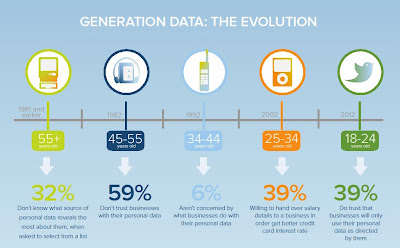
On the other hand a 2012 survey conducted by YouGov in Britain (and finding similar data to older surveys in the United States and elsewhere) found that the younger users of online services such as a social media site are more likely to trust that online service.

Click on the graphic to see the full report and infographic.
Online trust changes with age

All of which underscores that these latest revelations will make older users of Facebook are more likely to be concerned about privacy and it make very little difference for younger users.

What do you think? Should a social media platform be completely transparent about what information it is looking at and how that information is being used?

Related posts:
Facebook’s next big privacy change is still coming
Social Media Scams: 11 Tips to Fight Them
At the IPO: 5 Warning Signs of Facebook’s future

Sunday, November 3, 2013

Social Media Scams: 11 Tips to Fight Them

Scams are on the rise in social media
This guy's looking to scam you
Social media has come a long way and the more it grows the more it is fertile territory for scams and con artists.

Go to the urban legend site Snopes - and I highly recommend this site as THE best place on the web to check for any kind of scam or mischief – and enter the name of your favorite social network in the search box there. 

Whether it’s Facebook, Twitter, Pinterest or Instagram chances are there are several if not dozens of scams related to that platform listed on Snopes.

How easy is it for scammer and other malicious types to target us on social networks?

According to the 2012 Norton Cybercrime Report - from the company behind Norton computer and Internet security software - says people on social networks are increasingly falling victim to online scams. The report says of social network users:

- Four in 10 have fallen victim to cybercrime on social networking platforms 

- One in six report that someone has hacked into their profile and pretended to be them

- One in 10 have fallen victim to a scam or fake link on social network platforms

- 36 percent have accepted friend or follow requests from people they don’t know

- Only half use privacy settings to control what information they share and with whom.

This is just confirms what anyone on social networks already knows: As social media attract more and more people and they spend more and more time there scammers see opportunity.

The scams can be the annoying, but harmless "you need to change your Facebook settings"-type messages or they can be malicious links that are innocently shared because no one bothered to check them.

For example, recently two very smart people I’m connected to both fell for the Facebook Graph Search scam that starts with this … 

"Hello to all of you who are on my list of contacts of Facebook. I would like to ask a favor of you…. You may not know that Facebook has changed its privacy configuration once again. Thanks to the new "Graphic app", any person in Facebook anywhere in the world can see our photos, our "likes" and our "comments". During the next two weeks, I am going to keep this message posted and I ask you to do the following…"

While does Graph Search make it easier for you to find content on Facebook it does not change your privacy settings.

So what can you do to protect yourself and your family on social media? Here are my …

11 Basic Social Media Safety Tips:

Keep your personal information private: Be careful what information you share and post online and with whom you share it– expect that people other than your friends can see it.

Don’t post information that would make you or your family vulnerable: This might include details such as your date of birth, address, information about your daily routine, holiday plans or the school your children attend.

Set your online social networking profiles to private: Never share your account details with others and regularly update your computer’s security software. Note: If you choose not to set some accounts to private remember to be extra cautious about what you share and who you connect with.

Grant access cautiously: Apps often allow you to sign in via Twitter or Facebook, but in so doing are you granting unknown people access to your account? One small safeguard is to Google any app by name before clicking through. If there is trouble with an app chances are someone has posted about it.

Practice good password security: Use strong passwords (minimum of eight characters with a mix of uppercase and lowercase characters and at least one wild card character such as a dollar sign or an ampersand, for example). Change your passwords regularly and have a different password for each social networking site so that if one password is stolen, not all of your accounts will be at risk.

Try not to access social networking sites on public computers: Use your own computer or smartphone instead of the computers at libraries and other public places. Your login information can be intercepted.

Only "friend" real friends: Don’t accept a friend or follow request from a stranger - people are not always who they say they are and the best way to keep scammers out of your life is to never let them in. Likewise don’t answer social media messages or even cellphone texts from people or numbers you don’t recognize.

Use Google: Google yourself at least once a month search for your name and your own variations of it (i.e. “Jonathan Smith” and “Jon Smith”) and also use Google alerts on your name and family members’ names so that you get an email notification when your name crops up on the web. This can be an invaluable early warning that someone else is pretending to be you.

Be ultra cautious about any request for money even if it appears to be from a family member or a good friend. If you receive such a request, contact your friend via another means to check the request is genuine before responding. Do not use any of the contact details in the message.

Click with care: Never click on suspicious links on social networking sites – even if they are from your friends. If the link is from a trusted friend or has an identifiable URL you should be OK.

Educate your children on the dangers of social networking scams. Younger social media users may be more computer savvy than you, but they can be blissfully unaware of the dangers of identity theft and digital scams.

So, what do you think? Will you start being more careful with your information on social media? Will you encourage others to do likewise?

Possibly related posts:
Facebook’s next big privacy change is still coming
10 Tips for Social Media Beginners

Sunday, October 27, 2013

Facebook’s next big privacy change is still coming

Have you seen the warning signs?
We’re all on Facebook and seemingly can’t give it up, but should we?

In 2013 there have been some big changes in the way the social network handles its users' privacy.

The latest round of Facebook changes had a huge impact on teens and their online privacy. 

You might recall that earlier in October Facebook caused a stir by changing settings so that teens could make themselves discoverable on the platform.

In an Oct. 16 Los Angeles Times piece Facebook loosens privacy policy on teens' posts Jeffrey Chester, executive director of the Center for Digital Democracy, called on federal regulators to step in and protect teen privacy.

"To parents and teens, Facebook is claiming they are giving them more options to protect their privacy. But in reality, they are making a teen's information more accessible, now that they have the option to post publicly," Chester said, adding: "Today's announcement actually removes a safeguard that teens currently have."

Yes, Facebook says one thing but in reality seems to do another.

In an excellent piece on Bloomberg.com by Evan Selinger (a colleague at RIT) and Woodrow Hartzog Why Is Facebook Putting Teens at Risk? they argue that "… the most important reason Facebook shouldn’t have introduced this change is that teens need opportunities to fail safely. They must be allowed to experiment -- to make mistakes and to learn from them."

"As parents, our job is to encourage them to explore ideas, experiences and even personas," Selinger and Herzog say. "Responsible companies will do their part by offering teens technologies that enhance personal development and strive for minimal risk."

And the recent teen privacy changes come on top of Facebook’s earlier introduction of Graph Search (March, 2013).

Megan Marrs, in a well-written post Facebook Graph Search & Privacy Concerns: Should You Be Worried?” says Graph Search is “Now with more stalking power!” She describes how once anything that might have embarrassed you on Facebook was, over time, buried which was sometimes referred to as "privacy by obscurity." But now Graph Search means almost anyone can find anything at any time. Should you be worried? Her answer is a resounding “Yes!”

But wait, there’s more.

Facebook has a proposal in front of the Federal Trade Commission that would make your privacy even more of a thing of the past.

Vindu Goel, writing in the The New York Times’ Technology page in a piece called Facebook Eases Privacy Rules for Teenagers, notes that the Federal Trade Commission is conducting an inquiry into other proposed changes to FB’s privacy policies.

Goel notes: "Those policies would give Facebook automatic permission to take a user’s post, including a post made by a teenager, and turn it into an advertisement broadcast to anyone who could have seen the original post."

Facebook, it seems, is bent on erasing personal privacy in every corner of its network.

What can you do?

To argue for protecting children online you can contribute to the comments section of two proposals made to the Federal Trade Commission under the Children's Online Privacy Protection Rule at FTC Extends Public Comment Deadlines on Two COPPA Proposals -- there is a Nov. 4 deadline.

So what do you think? Is there any expectation of privacy on social networks such as Facebook? Or should people continue to use FB and other social media knowing that sooner rather than later they will not be able hide anything?

Possibly related posts:
9 Ways to Maintain (Some) Privacy on Social Media, the Web
(From 2012) At the IPO: 5 Warning Signs of Facebook’s future

Sunday, October 13, 2013

9 Ways to Maintain (Some) Privacy on Social Media, the Web

Online privacy can be hard to maintain
Privacy and social media might seem to make odd bedfellows and recent moves by some of the biggest online companies might make you think any privacy on social networks and the Internet is impossible.

This month alone: Facebook has removed another privacy setting and Google is alerting users to a change in its terms and conditions that allows your image and name to appear in Google ads. This, in October, the month Homeland Security has declared National Cyber Security Awareness Month. Not to mention the ongoing concerns about mass surveillance of online activities carried out by the U.S. National Security Agency (NSA) and its international partners. All the while, corporations are eagerly tracking data regarding your browsing habits and purchasing preferences.

So what, dear Web Wanderer, can you do to protect some shreds of your privacy on social media and elsewhere on the Internet?

9 Ways to maintain (Some) Privacy

1. Sign in and out of your online accounts: Yes, it’s convenient to have a computer remember passwords and other login details, but you’re playing with fire. At the most basic level it means anyone can sit at your computer and "be you" on your networks. At a more sophisticated level anyone who does hack into your computer now has access to your accounts. So, logout when you’re done and log back in each time …

2. Be a "Friends Only" kind of Facebook user: Understanding your FB settings may take 30 minutes one day, but it will be the best half hour you spend on yourself on the social network. Remember that anything other than the "Friends Only" setting means people you don’t know can see and share a lot about you. You also should be aware by now, but some apparently are not, that Facebook’s default is to set all of your privacy settings to "public."

3. Use a password on your devices: If you’re not using a password to get into your smartphone or laptop etc. that’s the equivalent of leaving your apartment or car unlocked. Think about the treasure trove of personal information now stored on those devices. Maybe, just maybe, someone finding your device won’t take advantage, but maybe not.

4. Turn on 2-step Authentication in Gmail: This means that in order for your Gmail account to be accessed from a new device, a person needs a code that's texted to your cellphone. So, even if someone gets your password somehow, they won't be able to use it to sign into your account from a strange computer.

5. Encrypt everything: Whole-disk encryption of computers isn't a bad idea. If your laptop is lost or stolen, it's nearly impossible for anyone else to get into your data without your password. The latest versions of Apple's iOS automatically encrypt the entire smartphone or tablet if a passcode is enabled. On Android devices, encryption is an easy option in the Settings menu.

6. Clear your browser history and cookies regularly: Consider changing your browser settings so that the cache is automatically cleared every session. Go to the Privacy setting in your Browser’s Options and tell it to "never remember your history." This will reduce the amount you’re tracked online, although a recent New York Times story – Selling Secrets of Phone Users to Advertisers – shows that the growing field of anonymous data tracking may eventually make this a moot point.

7. Review the apps that have access to your social media accounts: Regularly review which applications have access to your social media accounts. Revoke access for applications you no longer use. In future: make sure applications you download use social media carefully. If they ask for your contacts and to post to your account don’t agree to this lightly.

8. Get an app that you can use to remotely wipe your device if it is stolen or lost: Some of these apps can show where the thief took your phone and can erase all the data. All of them allow you to do this from a separate device.

9. Put a Google Alert on your name: Go to Google Alerts enter your name, and variations of your name, with quotation marks around each. Select how frequently you want alerts (daily is probably fine for most of us) and where you want them sent. It’s the easiest way to stay on top of what's being said about you online. Just be aware: it may only catch 85 to 90 percent of mentions and some alerts may take more than a day or two to get you. But it is free.

Other ideas:

Five ways to stop the NSA from spying on you (from the Washington Post) offers ways to thwart the agency's snooping.

Strategies People Use to be Less Visible Online is a story from the social media news aggregator Mashable. It finds that "64 Percent of American adults protect their online identities by clearing cookies and browser history" and has a useful chart listing all of the other tactics its survey respondents said they practiced.

In the future:

Imagine a small box sitting next to your computer that encrypts everything you do online. That’s the principle behind a device call the Don’t Snoop Me Bro Tunnel that I first read about recently on the Bit Rebels site. The DSMB will be (when it is available early next year) an out of the box plug-and-play technology that connects to your computer and claims to completely camouflage your online presence. The Bit Rebels story linked to here has a full description and demo video.

So, there you have a few ideas that might help you hang onto or gain back some shreds of privacy. Of course, the ultimate road to privacy is to stay off the web altogether and to erase all past history on the web … yeah, right! Like that is going to happen.

What do you think? Can you maintain some privacy and still engage on social media and the Internet?

UPDATE: Since writing this post another big change has hit if you are concerned about online and social privacy. The app Snapchat prided itself on having its messages disappear after a few seconds. But as of Oct. 14 a new app called SnapHack allows people to keep and retransmit messages from Snapchat. Read more at Business Insiderhttp://j.mp/SnapHack 

Possibly related posts:
10 Tips for Social Media Beginners
A New Online You